
Quick Share 1.0.0.18: Introducing Cloud Transfer
Quick Share 1.0.0.18: Introducing Cloud Transfer – Share Files Anywhere
Since the launch of Quick Share, our primary mission has been to provide the most reliable, secure, and seamless offline file-sharing experience across Android and Windows. We wanted to solve the fundamental problem of moving files between devices in the same room without the hassle of cables or the need for an active internet connection. Thanks to your incredible support and feedback, Quick Share has become a trusted tool for local transfers, empowering users to bypass slow public Wi-Fi and restrictive data caps.
However, we also listened to your most frequent request: "What if I need to send a file to someone who isn't on the same Wi-Fi network?"
Today, we are thrilled to announce the release of Quick Share version 1.0.0.18, which introduces a game-changing new feature: Cloud Transfer. This major update expands Quick Share’s capabilities beyond your local area network, allowing you to securely send files to anyone, anywhere in the world, with just a few taps.
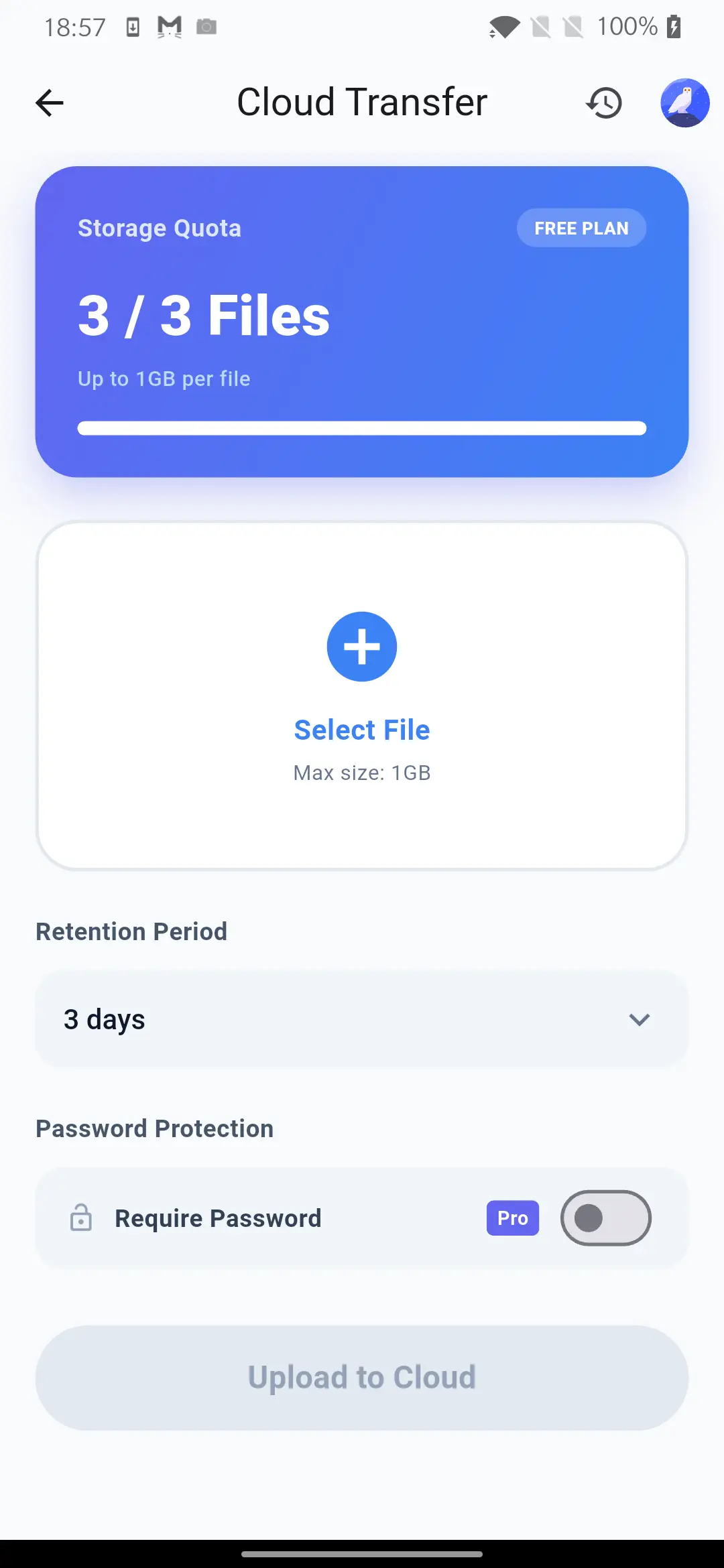
Why Cloud Transfer? Bridging the Gap
While our offline sharing feature remains the core of Quick Share for local needs, we recognize that collaboration often happens across distances. Whether you're a freelancer sending project files to an international client, a student sharing study materials with a classmate across town, or a family member sending high-resolution videos to relatives in another country, local sharing simply isn't enough.
Before this update, users had to switch between Quick Share for local transfers and other third-party cloud services for remote sharing. This fragmented the user experience and reintroduced the very problems Quick Share was built to solve: complicated interfaces, intrusive ads, and privacy concerns.
With the introduction of Cloud Transfer, Quick Share becomes your all-in-one file-sharing solution. You now have the flexibility to choose between lightning-fast local transfers and global cloud sharing, all within the same clean, familiar, and secure application.
How Cloud Transfer Works
We designed Cloud Transfer with the same philosophy of simplicity and user-friendliness that you’ve come to expect from Quick Share. There are no complicated setup processes or confusing server configurations.
Here’s how easy it is to use:
- Select Your Files: Just like a local transfer, choose the photos, videos, documents, or folders you want to share. Quick Share handles files of all types and sizes.
- Choose 'Cloud Transfer': Instead of scanning for local devices, select the new "Cloud Transfer" option in the sharing menu.
- Upload and Generate a Link: Your files are securely uploaded to our high-speed cloud servers. Once the upload is complete, Quick Share generates a unique, secure download link or a PIN code.
- Share the Link: Send the link or PIN to your recipient via your preferred messaging app, email, or social media.
- Easy Download: The recipient simply enters the PIN in their Quick Share app or clicks the link on any device to download the files directly. They don't even need to have the app installed if they use the web link!
Security and Privacy at the Core
We know that when you share files over the internet, security and privacy are your top concerns. We have built Cloud Transfer from the ground up with robust security measures to ensure your data remains protected throughout the entire process.
- Secure Infrastructure: We utilize enterprise-grade, encrypted cloud storage solutions to host your files temporarily.
- Time-Limited Access: To prevent your files from floating around the internet indefinitely, Cloud Transfer links are designed to expire automatically after a set period. Once the time is up, the files are permanently deleted from our servers.
- No Unnecessary Data Harvesting: Consistent with our privacy-first approach, we do not scan, analyze, or monetize the contents of your transfers. Your data is yours alone. We act simply as the secure courier delivering your package.
The Perfect Balance: Local and Cloud in Harmony
The beauty of version 1.0.0.18 is that it doesn't replace the offline sharing you love; it complements it.
- In the Office? Use the local network transfer to instantly send a massive video render to your colleague sitting at the next desk at gigabit speeds, completely free of charge.
- Working Remotely? Use Cloud Transfer to securely deliver that same video to a client halfway across the globe.
Quick Share intuitively adapts to your needs. The interface seamlessly integrates both options, allowing you to choose the best tool for the job without ever leaving the app.
What Else is New in 1.0.0.18?
While Cloud Transfer is the star of the show, this update also includes several under-the-hood improvements to make your overall experience even better:
- Enhanced Transfer Speeds: We've optimized our local network discovery protocols, making offline connections faster and more stable, especially in environments with multiple Wi-Fi networks.
- UI Polish: We’ve made subtle refinements to the user interface for a cleaner look and smoother animations.
- Bug Fixes: We’ve squashed various minor bugs reported by our community, improving the overall reliability of the app on both Android and Windows platforms.
Looking Ahead
The release of Cloud Transfer marks a significant milestone in Quick Share's evolution. It transforms our app from a localized utility into a comprehensive sharing platform. However, our journey is far from over.
Our development team is continuously working to bring Quick Share to more platforms, including macOS and iOS, and we are already exploring new ways to enhance both the local and cloud sharing experiences. We are exploring features like end-to-end encryption for cloud transfers, customizable expiration times, and enhanced file management tools.
Update Now and Experience the Freedom
We can't wait for you to try Cloud Transfer and experience the ultimate freedom in file sharing. If you already have Quick Share installed, check for the 1.0.0.18 update in the Google Play Store. Quick Share for Windows will be available from the Microsoft Store soon.
If you are new to Quick Share, there has never been a better time to join our community.
Thank you for your continued support and feedback. Your input drives our innovation. Try out Cloud Transfer today and let us know what you think!